
Do you want to connect an earpiece, an external microphone, or noise-canceling headphones to your hunting radio? Before choosing your accessory, you need to check one essential element: the connector of your radio.
K1, M1, I1… These references may seem obscure, but they help distinguish several types of plugs used to connect radios to audio accessories.
Find the compatible connector for your equipment
Do you know the brand and model of your radio, your headphones, or your earpiece? Use our search tool to find the connector listed in our compatibility chart.
Don’t see your model on the list? That doesn’t necessarily mean it’s incompatible; it may simply be that the connector type hasn’t been verified yet. Please contact our team before placing your order.
Why is the connector of your radio important?
A hunting radio allows you to communicate with other hunters during a drive, a tracking session, or an outing in the field. To hear messages without constantly holding the radio in your hand, you can use different accessories:
an earpiece with a microphone;
an external microphone with a PTT button (Push-To-Talk) ;
a noise-canceling headset equipped with a communication system;
a cable connecting a headset to the radio;
a Bluetooth adapter to use a headset or a wireless earpiece.
But be careful: not all these accessories plug into the same sockets.
An incompatible connector can prevent the accessory from being plugged in or functioning properly. It is therefore advisable to precisely identify the model of your radio before ordering.
K1, M1 or I1 connectors: what are the differences?
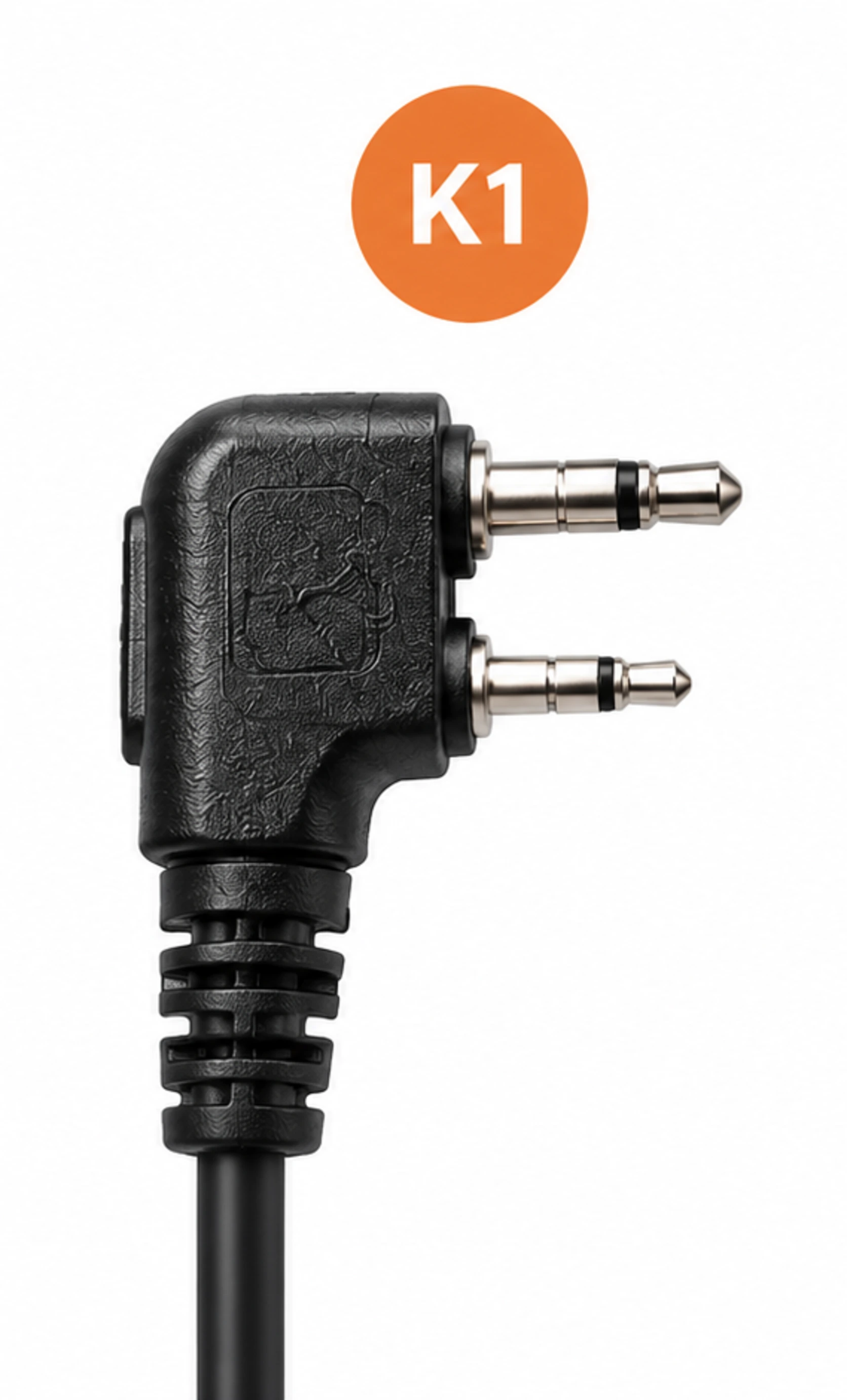
K1: the Kenwood type connector
The K1 connector, often referred to as "Kenwood 2 pin," generally uses two plugs of different diameters. It is common across several families of radios and walkie-talkies.
The K1 plug is generally recognizable by its two plugs of different diameters, one wider than the other. On common models, they measure approximately 3.5 mm and 2.5 mm in diameter.
It can be found on many Kenwood models and on some radios from other brands, such as Baofeng or Retevis. Compatibility should still be checked for each model.
What accessories should you look for?
Earpieces and microphones with K1 plug;
accessories with PTT button;
K1 cables and adapters;
Bluetooth adapter for K1 compatible radio.
At The Hunter Camp, our Bluetooth adapter for Kenwood K1 compatible hunting radio allows you to connect a radio equipped with this connector to a compatible Bluetooth headset or earpiece.
M1: the Motorola type connector
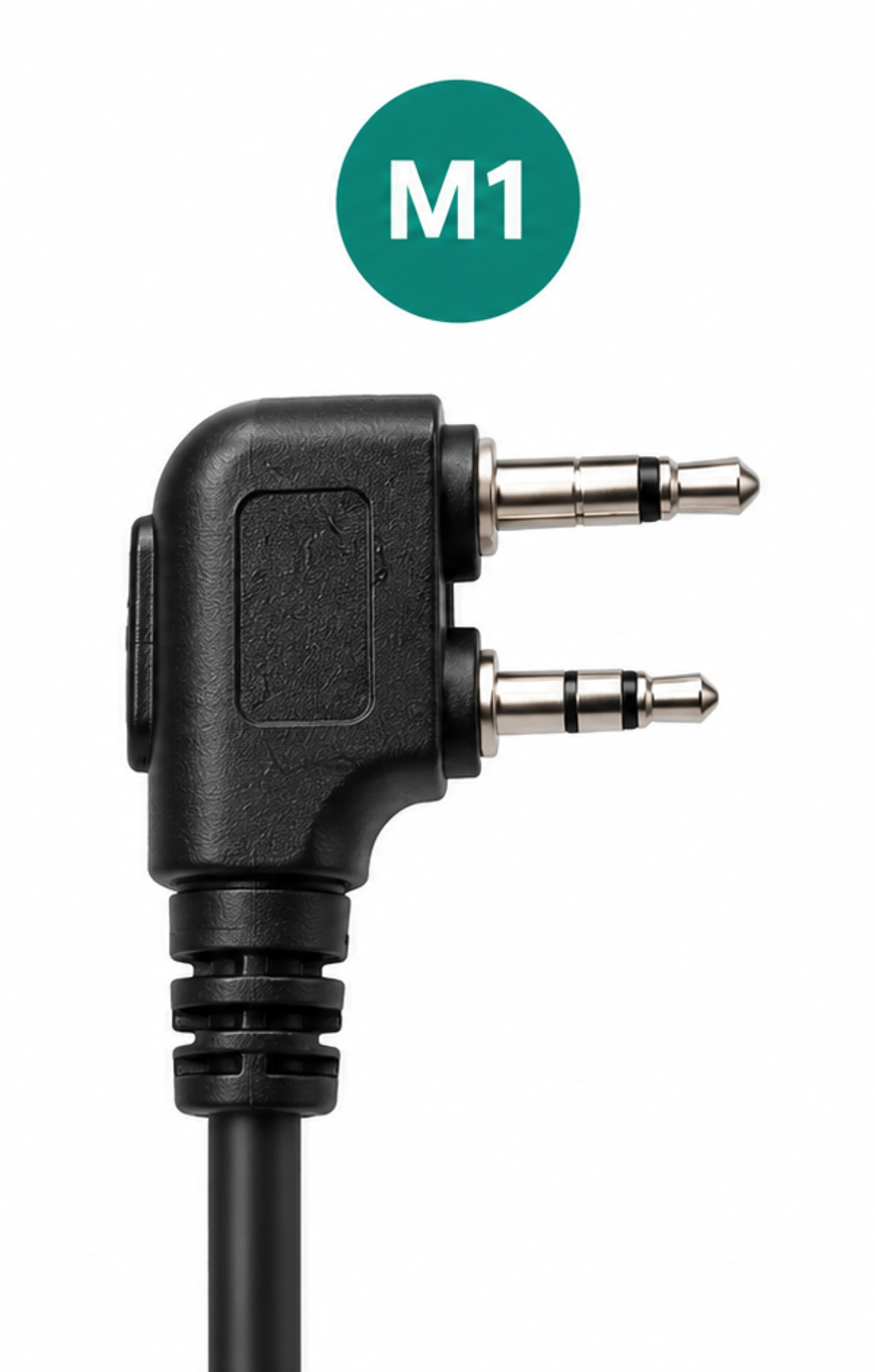
The M1 connector is notably used on certain professional Motorola radios and on some devices from other manufacturers.
Some connectors feature two plugs, but the spacing between them may differ from the K1 standard. Consequently, two connectors might look similar but not be interchangeable.
On current M1 models, the spacing between the centers of the two plugs is approximately 8 mm.
What accessories should you look for?
Compatible M1 earpieces ;
remote microphones with PTT button ;
audio accessories and cables designed for the specific radio model.
Before purchasing, check the exact reference of your radio and the compatibility stated by the accessory manufacturer.
I1: a connector to be precisely identified
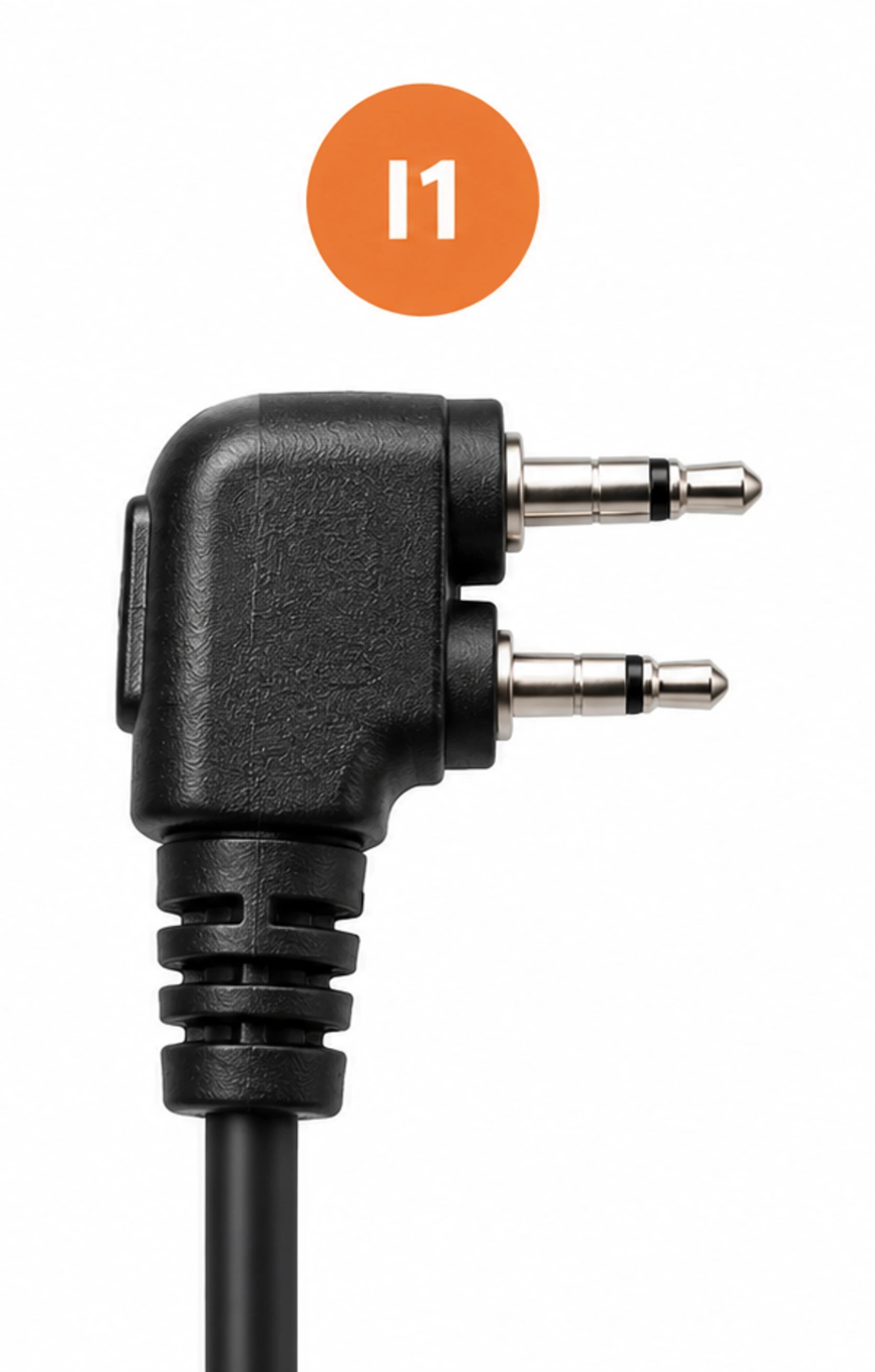
The designation I1 is used in some accessory catalogs for radios, but it alone is not sufficient to guarantee compatibility with an Icom radio.
Some two-pin I1 versions have a spacing of approximately 10.5 mm.
Devices from the same brand may use different plugs depending on their range and generation. Therefore, it is necessary to check the exact model and reference of the accessory, rather than relying solely on the brand name.
Our advice : if you are looking for an earpiece or a cable for an Icom radio, consult its manual or provide us with its reference before ordering.
How to identify the connector of your radio?
To avoid an ordering mistake, follow these steps :
Identify the brand and model of your radio. This information is usually found on the device, under the battery, or in the manual.
Look at the audio jack, often located on the side of the radio and protected by a cover.
Check the announced connectivity on the product sheet of the accessory. A mention of "two pins" is not always sufficient.
Check the complete compatibility, especially if you are using a noise-canceling headset, a specific cable, or a Bluetooth adapter.
Don't have the manual or don't know the exact model? The safest option is to send us a photo of the radio and its audio jack.
Can a Bluetooth headset be used with a hunting radio?
Yes, in certain configurations. A Bluetooth adapter compatible with the radio's audio jack allows communications to be transmitted to a compatible Bluetooth headset or earpiece.
However, it is necessary to distinguish between two elements:
The connectivity on the radio side, for example K1, which determines the connection to the radio.
The connection on the headset side, for example Bluetooth, which allows for wireless connection.
A Bluetooth headset is therefore not automatically compatible with all radios. It is necessary to check the adapter used and the operation of the whole.
Discover our Bluetooth adapter for hunting radio compatible with Kenwood K1.
Mistakes to avoid before buying a radio accessory
Choosing an accessory solely because it is advertised as compatible with your radio brand.
Confusing a two-pin jack with a K1 or M1 connection without checking its dimensions and wiring.
Thinking that a Bluetooth headset can connect directly to any radio.
Ordering a headset cable without checking the connectors on both ends.
When in doubt, check the exact reference of each item. It’s the best way to avoid an unusable accessory in the field.
FAQ - Frequently Asked Questions
K1 is the commonly used name for a type of connector associated with Kenwood. Some devices from other brands also use it. However, you must check the compatibility of the specific model.
Not automatically. These connectors may look similar, but their dimensions and wiring may differ. Never force a connection.
No. A brand can market several ranges of radios with different connectors. Always check the exact reference.
Start by identifying the model of your radio and its connector. Then choose an earpiece or PTT microphone explicitly stated as compatible with that model or type of plug.
Yes, it is designed to accompany hunters in the field.
Need help choosing?
At The Hunter Camp, we know that poorly chosen connectivity can complicate the preparation for your next hunt. If you're unsure between K1, M1, or another connector, let us know the brand and model of your radio: we will help you identify the suitable accessory.
The Hunter Camp, your hunting gear designed for the field.